Start with the experience we can actually offer
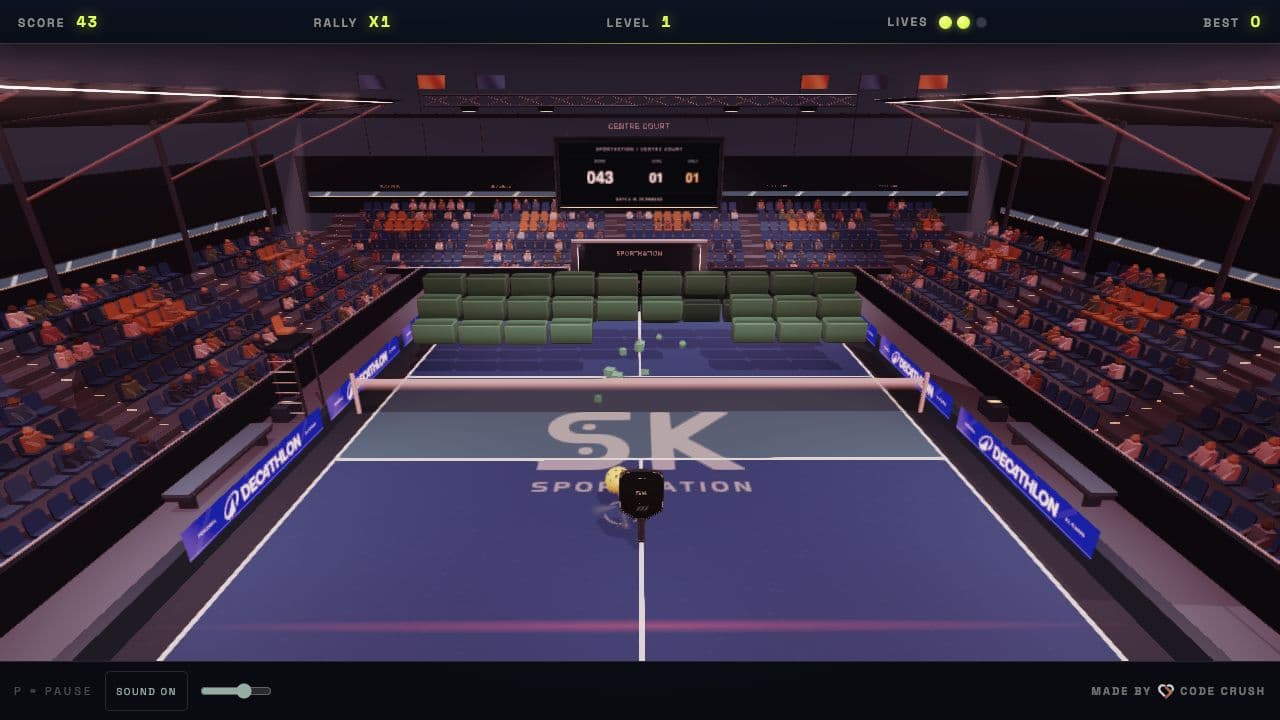
Pickleball Breaker is Sportkation’s browser-based arcade game, built with Code Crush. People can discover the game from a link and play on the web. That makes it a useful starting point for a campaign that introduces pickleball and gives people a reason to spend time with the Sportkation brand before exploring a stay.
A campaign brief such as “let people play in a Facebook ad and collect their Facebook details” combines three separate requirements: where the game runs, where the ad sends the player, and how contact information is shared. Choosing the correct combination matters more than making a miniature version of the game first.
This guide describes a proposed campaign architecture, not an announcement that these advertising or lead capture integrations are live. It does not change the game’s current sign-in options or the conditions of any Sportkation challenge. Platform requirements were checked against Meta’s documentation on 2 November 2026.
Three routes, with different priorities
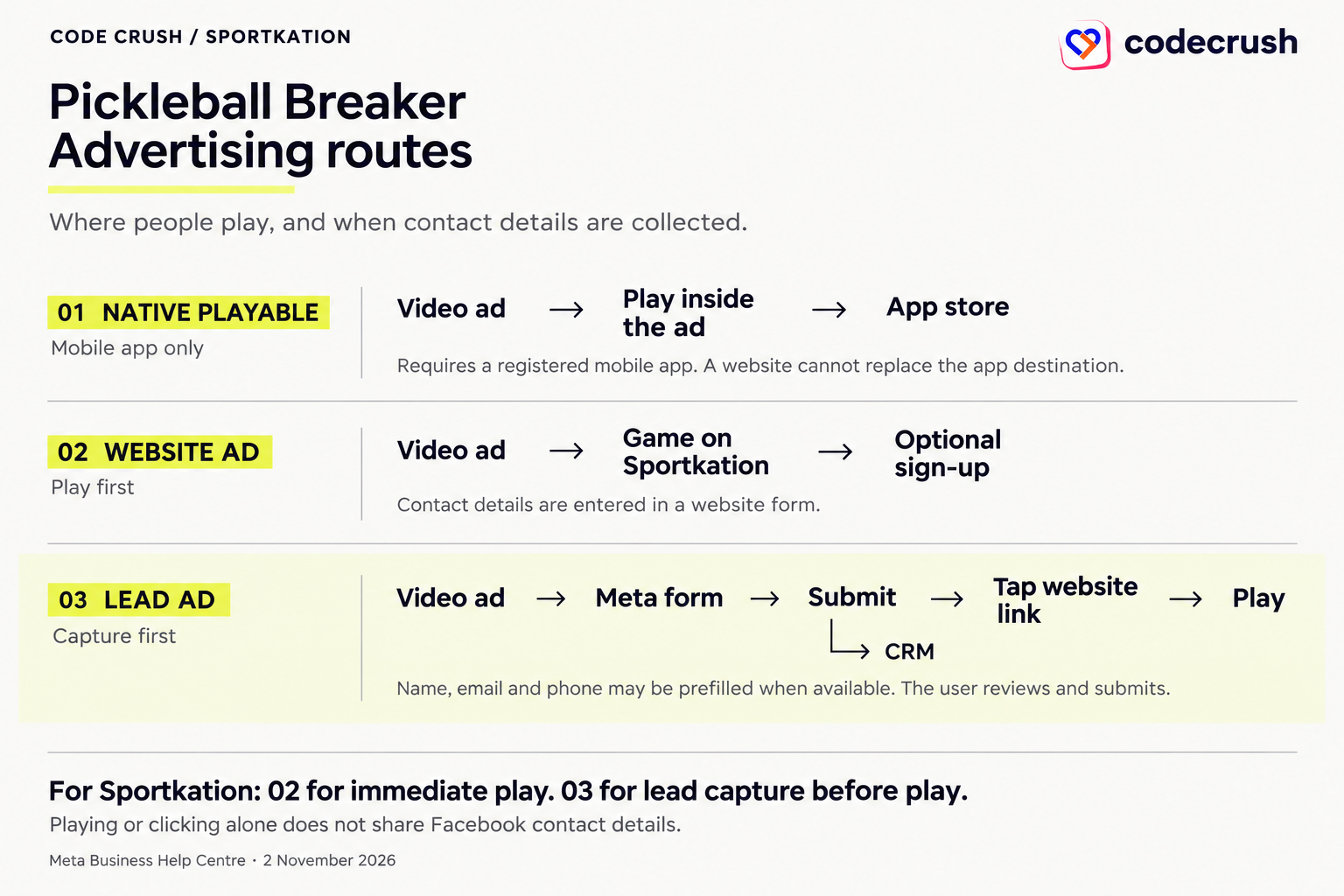
A native Meta playable is a short interactive app preview served as advertising creative. A website game is an experience reached after someone clicks an ad. A Lead Ad opens a Meta Instant Form that can collect contact details before a person chooses to visit the website. They may use similar gameplay footage, but they are different products and require different campaign setups.
For the current Sportkation website, the practical choice is between letting people play first and inviting them to share details afterwards, or collecting a submitted lead first and offering a clear link to the game on the form’s completion screen.
| Route | Where people play | Campaign setup | Destination | Contact capture |
|---|---|---|---|---|
| Native playable | Inside the ad | App promotion | Registered mobile app | No automatic Facebook contact sharing |
| Play-first website | On Sportkation after a click | Website campaign | Browser game | Optional website form |
| Lead-first Instant Form | On Sportkation after submission and another click | Leads · Instant Form | Form, then website game | Submitted form fields, prefilled when available |
Case 1: a native playable requires a mobile app
Meta’s current upload instructions require the App promotion objective and a registered app selected by name or its exact store URL. The instructions explicitly exclude other objectives and describe an upload error when an app is not selected or the advertiser lacks access. The developer guide also shows an application ID and an app-store URL in the promoted object. [1, 2]
Therefore, Sportkation’s website URL cannot simply replace the mobile app destination in the documented native playable setup. A valid HTML demo by itself does not make a website campaign eligible for this format. Calling FbPlayableAd.onCTAClick() is an integration requirement for the ad’s call to action; it is not a way to choose an arbitrary web destination.
If a mobile app becomes part of the product later, an app-install campaign can be assessed separately. Until then, packaging the full browser game as a native playable would solve the wrong distribution problem.
Official references: [1] Meta: Upload a playable source file · [2] Meta for Developers: Playable Ads for Mobile Apps
Case 2: let people play on Sportkation first
The play-first route uses a conventional Facebook or Instagram image or video ad with a link to the browser game or a dedicated game landing page. After the click, gameplay takes place on the Sportkation web experience, including when the page is opened in an in-app browser.
The first screen should make the next action obvious: a recognisable court, one brief instruction and a clear way to start. The game should remain understandable without sound. A short introductory challenge can be designed for the campaign, while the complete game remains available to people who want to continue. An optional form after a result gives interested players a next step without interrupting the first rally.
This route prioritises the experience. It also accepts that some players will enjoy the game and leave without becoming a contact. A website form receives the details a person enters and submits; arriving from Facebook does not prefill that form with their Facebook profile.
- 1See a gameplay ad and choose its website link.
- 2Load the Sportkation game and start a match.
- 3Finish an introductory experience or continue playing.
- 4Optionally submit a clearly explained website form.
- 5Explore Sportkation experiences or request further information.
Case 3: use a Lead Ad to capture first, then play
When the priority is contact information that Meta may already hold, the lead-first route is the closer fit. The campaign uses the Leads objective with an Instant Form. Meta documents Instant Forms and website forms as separate lead generation destinations and describes connecting submitted leads to a CRM. [3]
The ad should explain the sequence before someone opens the form. A suitable message is “Leave your details, then try Pickleball Breaker on Sportkation.” Avoid a promise to play immediately inside the ad when the next screen is a form. The value of the interaction should be clear even to someone who decides not to submit.
The game is reached through the completion screen’s website button. Submitting the form creates a lead; opening the game is a separate user action. A person can submit and never tap the website button. These should be measured separately.
- 1The person taps a Facebook or Instagram Lead Ad.
- 2A Meta Instant Form opens with the campaign introduction and selected questions.
- 3The person reviews available prefilled details, makes corrections and submits.
- 4The completion screen explains the next step and offers a website button.
- 5The person taps that button and plays on the Sportkation website.
Official references: [3] Meta: Campaign setup for lead generation forms
Design the Instant Form around a clear request
Ask only for fields the team needs to handle this specific enquiry. Name and email may be enough for an initial interest campaign. Phone can be appropriate when a person is requesting a call, but it should not be collected merely because the field is available. Meta can prefill supported contact fields when information is available; prefilled values are not a promise that every lead has a current or verified phone number or email.
Use the introduction to explain who is collecting the details, why, and what communication to expect. Include a privacy policy link that describes this use. If the business wants permission for ongoing promotional messages, make that request clear and separate from simply sending a score or answering an enquiry; choose the notices and permissions appropriate to the audience and intended use.
Keep questions about interest focused. For example, a single optional choice between learning pickleball, improving an existing game or organising a group stay can help the team respond. These are campaign design examples, not new booking requirements. Avoid a long questionnaire before people have even seen the game.
- Explain that the game opens on the website after submission.
- Use supported contact fields and let people review them.
- Describe follow-up honestly; do not imply that gameplay requires marketing permission.
- Link to the appropriate privacy information.
- Preview the form on actual mobile devices before launch.
Make the completion screen a real bridge to the game
The completion screen should acknowledge submission and make the website action easy to find. For example: “Thanks — your details have been sent. Use the button below to play Pickleball Breaker.” Set the available website call to action to the game URL and preview the exact button label supported by the selected form configuration.
Do not rely on an automatic redirect, and do not put another registration form immediately behind the link unless there is a clear additional reason. A second unexplained gate makes the first submission feel wasted. The landing page should repeat the game name and instructions shown in the ad so the visitor knows the journey is continuing.
A campaign-tagged destination can distinguish completion-screen visits from ordinary website visits. Use campaign identifiers in tracking parameters, not names, emails or phone numbers. The tag describes the campaign; it does not identify which particular lead arrived.
Move submitted leads into a usable CRM workflow
Lead collection is only useful if the operations team can find and handle the submission. Before launch, connect the Instant Form to an authorised CRM integration or establish a controlled export process. Meta’s lead generation guide explicitly distinguishes lead retrieval from sending later CRM outcomes back for advertising optimisation. They are related integrations, not the same operation. [3]
Map each selected form field to a known CRM field. Keep the platform lead ID when available, the form and campaign identifiers, submission time and the recorded privacy or permission context. Use the platform lead ID to make repeated delivery safe: receiving the same submission twice should update or ignore the existing record rather than create duplicate contacts.
Assign an owner and a follow-up state. Check that the expected details reach the correct workspace, that integration failures are visible and that retries can recover missed deliveries. Keep tokens and app secrets on the server. A CRM sync normally happens independently of the player clicking through to the game.
- Create or update a lead record with a stable external identifier.
- Store source campaign and form identifiers alongside the submitted fields.
- Route the record to the team responsible for the requested follow-up.
- Record delivery failures and reconcile platform submissions with CRM records.
- Restrict access to contact information to people who need it.
Official references: [3] Meta: Campaign setup for lead generation forms
A lead submission is not a game account
The completion screen’s website link does not automatically sign someone into Sportkation or establish that a particular match belongs to a particular lead. Even an email included in a form can be edited by the person submitting it. It should not silently become proof of identity.
For aggregate reporting, count website arrivals, game starts and form submissions as distinct events. If the campaign needs to associate a saved score with a person, design a separate, explained account or verification step. Use an appropriate authenticated or short-lived server-side handoff rather than placing contact details in a public link.
Facebook Login would be another integration with its own permissions and availability considerations; it is not supplied by adding a Meta Pixel, uploading a playable or using a Lead Ad. The game’s existing sign-in flow should be described accurately in any campaign copy.
Be precise about what is and is not collected
An ad impression, a click or a game session does not hand Sportkation a player’s Facebook contact details. In the lead-first route, the business receives the fields submitted through the Instant Form and any associated data made available through the authorised integration. This is not access to a person’s entire profile, friend list or private activity.
Contact collection, game analytics and advertising measurement should be explained as separate purposes. Make the published privacy information and permission choices consistent with the actual tools used. Keep promotional follow-up within the scope communicated to the person, provide an appropriate way to stop it and define how long the data is needed.
Avoid personal information in URLs, browser analytics event labels, screenshots or error logs. Use opaque identifiers where a technical link is necessary. An implementation should be reviewed for the markets it serves and the information it collects; this campaign design is not a statement that every possible use of a lead is authorised.
Prepare the game for mobile ad traffic
People arriving from a feed are deciding quickly whether to stay. The landing experience should give them a useful first frame promptly, show loading progress when needed, and introduce controls in a single step. Test touch movement, serving, screen orientation, sound activation, pause and return from the browser’s background state.
The website route does not inherit the native playable file-size limit, but that is no reason to deliver every 3D asset before the first interaction. Load only the court and equipment needed for the initial experience, defer optional environments and avoid placing a leaderboard or sign-in request in front of the first action. Any short demo should remain representative of the actual game.
Test the precise destination used by the campaign, including redirects and campaign parameters. A page can work in a desktop browser and still behave differently in Facebook or Instagram’s in-app browser. Always check the connection between an ad promise, the first screen and the actual playable experience.
Create an ad that explains the next action
Use recognisable gameplay rather than a long brand introduction. A short vertical edit can show the paddle moving, a target breaking and a clear invitation to try the game. Make the controls understandable visually and include captions when the message depends on speech.
Create distinct messages for the two website routes. The play-first version invites a click to play. The lead-first version explains that the person will leave details before visiting the game. Keep any mention of stays, coaching, prizes or competitions tied to a real offer with its own current conditions. This guide does not introduce a giveaway or promise that a game score wins a stay.
Test the opening scene, headline or explanation of value in small, controlled variations. Avoid changing the form, game difficulty and targeting at the same time if the aim is to understand which part improved the journey.
Measure the complete journey, not just cheap clicks
A click is the start of a possible visit, and a submitted lead is the start of a possible relationship. Neither proves that someone played the game or wanted a Sportkation stay. Define the outcomes that matter before choosing the reporting view.
For the website route, useful signals include a successfully loaded landing page, a first serve and a completed introductory challenge. For the lead-first route, add form opens, submitted forms, successful CRM deliveries and visits from the completion screen. A qualified enquiry should have a written definition, such as a person who confirms interest in a specific Sportkation experience.
Compare rates only when the numerator and denominator use compatible populations and time windows. Website game starts divided by all Meta lead submissions can be a directional journey indicator, but it is not a person-level match rate. CRM and browser counts can differ because of attribution, repeat visits, tracking choices and people who submit without continuing.
| Signal | What it establishes | Reporting rule |
|---|---|---|
| Landing-page arrival | The website loaded | A click alone does not establish this |
| Game start | The player starts a match or serves | Keep the event definition consistent |
| Completed experience | The defined introductory goal is reached | Do not count page time as completion |
| Lead submission | The person sends the form | Separate from visiting or playing |
| CRM delivery | The submitted lead reaches the correct workspace | Reconcile deliveries and avoid duplicates |
| Qualified enquiry | The person meets an agreed business definition | Judge interest, not just field completion |
Run an end-to-end check before spending on delivery
A successful preview should demonstrate both the player journey and the team’s ability to handle the resulting enquiry. Use clearly labelled test submissions and check what was actually saved. Test a correction to a prefilled field as well as a normal submission.
The critical distinction is between “the form accepted a submission,” “the record reached the CRM,” and “the person opened the game.” Verify all three without assuming that one guarantees the next. Confirm that any retry does not create duplicate CRM entries, and that someone is responsible for recovering failed deliveries.
- Check the campaign objective, destination and form against the intended route.
- Confirm the privacy link, requested fields and explanation of follow-up.
- Submit a test lead and inspect the correct CRM record.
- Tap the completion screen’s website button and start a game on a real phone.
- Check campaign tags and events without exposing personal information.
- Test loading, touch controls, audio, interruption and return.
- Review public game copy, current challenge terms and any stay-related claims.
- Approve the final creative, destination, tracking and campaign settings before launch.
Choose the first Sportkation pilot around one primary goal
If the goal is to let more people experience Pickleball Breaker, start with the play-first website route and evaluate meaningful game starts and completed experiences. If the goal is contact capture from Facebook or Instagram, start with a Lead Ad and Instant Form, then offer the website game from the completion screen.
For the lead-first pilot, the proposed deliverables are a short gameplay creative, an accurately described Instant Form, a completion-screen website link, the mobile game destination, an authorised CRM connection and a reporting view that separates submissions from gameplay. Treat those as items to build and validate, not as features this article activates.
Once the complete journey works, compare a small number of variations against a clear success criterion. A higher form submission rate is not automatically a better result if fewer people want the follow-up. Likewise, a highly played game should not be dismissed merely because it is optimised for discovery rather than immediate contact capture.
Questions people ask about this setup
Can someone play directly inside a Meta ad and then be sent to Sportkation instead of an app store? The documented native playable setup requires mobile app promotion and a registered app destination. For this website-only campaign, the game should be reached after the ad click or from a submitted lead form’s completion screen. [1, 2]
Will Meta automatically share the player’s name, email and phone? No. A supported field may be prefilled in an Instant Form when available, but the person reviews and submits the form before the business receives the submitted details. Playing alone does not share them.
Does submitting the form prove that the person played? No. The person must still tap the website button and start a match. Report these as separate actions.
Does a Lead Ad save a score or enter someone into a Sportkation competition? No. Any account, score-saving or competition process follows its own current flow and published conditions. The proposed advertising journey does not replace those rules.
Official references: [1] Meta: Upload a playable source file · [2] Meta for Developers: Playable Ads for Mobile Apps
Official sources and further reading
Requirements checked on 2 November 2026. Review the current Meta instructions and the campaign preview before launch.
From a digital rally to a real court
Try the browser game, then explore the Sportkation pickleball experiences that inspired it. The advertising journey described here is a proposal to validate before launch.